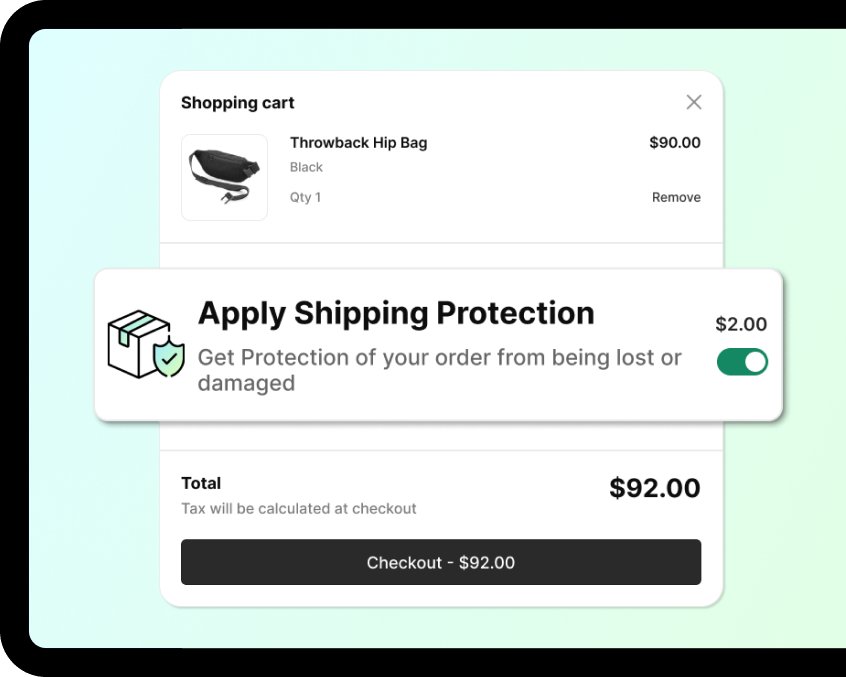
Insureful helps you offer shipping protection directly in your store so customers can insure their orders for added peace of mind. You can create custom insurance plans based on a fixed fee or a percentage of the cart value, with flexible minimum and maximum limits. If a customer files a claim, they’re instantly notified by email, keeping the process smooth and transparent. Insureful helps you protect orders, reduce losses, and turn protection into an additional revenue stream.

You can customize your insurance pricing using either a flat fee or a percentage of the customer’s cart value, based on your business needs.
The Insureful protection widget appears directly on the cart and checkout pages, making coverage visible at the right moment.
When handling claims, you can choose the resolution method that fits best — issue store credit, resend the product, or provide a full refund.
Insurance coverage is automatically applied when an order meets your predefined plan conditions, ensuring a smooth and hands-free experience.
The app supports multiple languages and currencies, making it suitable for stores serving global customers.



![defenseinnovation[1]](https://centousapps.com/wp-content/uploads/2024/07/defenseinnovation1.png)
![Forest_Fresh_Logo[1]](https://centousapps.com/wp-content/uploads/2024/07/Forest_Fresh_Logo1.svg)
![KK_-_Logo_2024[1]](https://centousapps.com/wp-content/uploads/2024/07/KK_-_Logo_20241.svg)
![Official_VIP_Logo_1[1]](https://centousapps.com/wp-content/uploads/2024/07/Official_VIP_Logo_11.png)
![upcart_header_logo_1742254222193[1]](https://centousapps.com/wp-content/uploads/2024/07/upcart_header_logo_17422542221931.png)




![Untitled_design_4_15d54c60-1b5b-4f62-bf39-f2025288941f_440x[1]](https://centousapps.com/wp-content/uploads/2024/07/Untitled_design_4_15d54c60-1b5b-4f62-bf39-f2025288941f_440x1.png)



![Secondary_Logo_1_Pink_e8f4a2ec-6ddc-47e8-b97e-5763b6773611[1]](https://centousapps.com/wp-content/uploads/2024/07/Secondary_Logo_1_Pink_e8f4a2ec-6ddc-47e8-b97e-5763b67736111.png)



Choose the plan that best suits your needs and budget.
Free
Free

30 PROTECTED ORDERS/MONTH
Fixed & Percentage plans
One-click installation
Revenue Boost
Best claim management
Live Chat & Email Support
Zero revenue sharing, it's all yours
Basic Plan
$9.95/month
UNLIMITED ORDERS
Fixed & Percentage plans
One-click installation
Revenue Boost
Best claim management
Live Chat & Email Support
Zero revenue sharing, it's all yours
Advance Plan
$29.99/month
UNLIMITED ORDERS
RECOMMENDED FOR SHOPIFY PLUS STORES
Show widget on checkout page
Show widget on Thank you page
Multi-language Support
Multiple percentage plans by cart total
Live Chat & Email Support
Zero revenue sharing, it's all yours
Certainly! Crafting an effective Frequently Asked Questions (FAQ) section is crucial for providing clarity and addressing common concerns. Here's a template you can use as a starting point:
After installing the app, the insurance switcher automatically shows on your cart page based on the configuration.
The insurance plans will be decided based on the cart min and max value. Either it can be fixed or based on percentage. We have two types of plans: 1) Fixed: You can charge a Fixed amount in this plan type - It has two sub-plans A) Plan by cart values: Here, you can create the multiple plans based on cart min and max amount B) Single Plan: It will charge fixed amount or fixed percentage amount only 2) Percentage: You can charge base don the percentage in this plan type - It has two sub-plans A) Plan by cart values: Here, you can create the multiple plans based on cart min and max amount B) Single Plan: It will charge fixed amount or fixed percentage amount only
The customers need to open the claim page. On that claim page based on the email address and order id, they can submit the claim request with the reason and attachments. Then, admin will see the claim request and fulfill the claim.
Admin can fulfill the claim with two options: 1) Refund by the amount: Using this option customer can generate the refund for that order directly from the app. 2) Reorder: Using reorder admin can generate partial refund as well.


Most e-commerce products require data input from the customer before they make their purchase. These data inputs may be anything from shoe sizes to shirt colors.

Testimony – Customer Reviews or Testimonials are social proof of your work and an essential part to build trust with your customers. Using a testimonial app, you can collect your client’s review.

Get to know the most liked products by increasing customer engagement with adding a like button on your product pages. Liked products make a social proof for your visitors.

One click setup without any hassle! T&C checkbox will immediately appear above the checkout button. Purchasing at an online store is not without its risks, both for the buyer and the seller.

If you have a new or existing store and need to add or update product images, this app can be very helpful. With the product handle or SKU, you can easily import a CSV file.